


Latest Projects

MattRoe LTD /
e-Commerce Online Shop

Oak Furniture Direct LTD /
eBay Shop Design
Testimonials
If, you are looking for an up and coming eBay shop design company who are skilful, fast, communicative and affordable, then you won't go far wrong by putting your trust in Fandango Web Solutions.....Read More
Colin Houghton -
colinsfoto
colinsfoto
I was looking for someone to design and code my ebay store front and listing template. I was recommended by another ebay member to contact Fandango Web Solutions as they had been very impressed with there service.....Read More
Kerri Bullock -
Babyonthego

Babyonthego
Admin Control Panel
All of our ecommerce websites are provided with a full Admin Control Panel which comes with a host of great tools. These are all accessed via a secure login area and can be split into the following categories:

 Click to enlarge

Click to enlarge

Click to enlarge

Click to enlarge

Click to enlarge
Click to enlarge

Click to enlarge
Click to enlarge

Click to enlarge
Dashboard
 Click to enlarge
The dashboard area supplies you with an overview of the number of sales, orders, customers, products and customer reviews. This area also displays the most recently made orders.
Catalogue
 Click to enlarge
The Catalogue area consists of the following:
Categories - This section allows you to add, edit and delete your shop categories.
Products - Here you can add, edit, copy and delete products within your shop.
Manufacturers - This area allows you to add, edit and delete Manufacturers/brands within your shop.
Categories - This section allows you to add, edit and delete your shop categories.
Products - Here you can add, edit, copy and delete products within your shop.
Manufacturers - This area allows you to add, edit and delete Manufacturers/brands within your shop.
 Click to enlarge
Downloads - This section allows you to upload a CSV (Excel) file to import your products in bulk.
Reviews - Here you can add, edit and delete customer reviews from products within your shop.
Information - This area allows you to add, edit and delete custom pages within your shop.
Reviews - Here you can add, edit and delete customer reviews from products within your shop.
Information - This area allows you to add, edit and delete custom pages within your shop.
Extensions
 Click to enlarge
The Extensions area has 4 main sections:
Modules - This area allows you to edit and delete modules within your shop such as Latest Products, Specials etc.
Shipping - The Shipping section is where you can select the method of delivery available to your customers.
Modules - This area allows you to edit and delete modules within your shop such as Latest Products, Specials etc.
Shipping - The Shipping section is where you can select the method of delivery available to your customers.
 Click to enlarge
Payments - Here you can select the method of payment available to your customers. There are currently over 19 methods to choose from including PayPal, WorldPay and SagePay.
Product Feeds - This area allows you add your products to Google Sitemap and Google Base via the click of a button.
Product Feeds - This area allows you add your products to Google Sitemap and Google Base via the click of a button.
Sales
 Click to enlarge
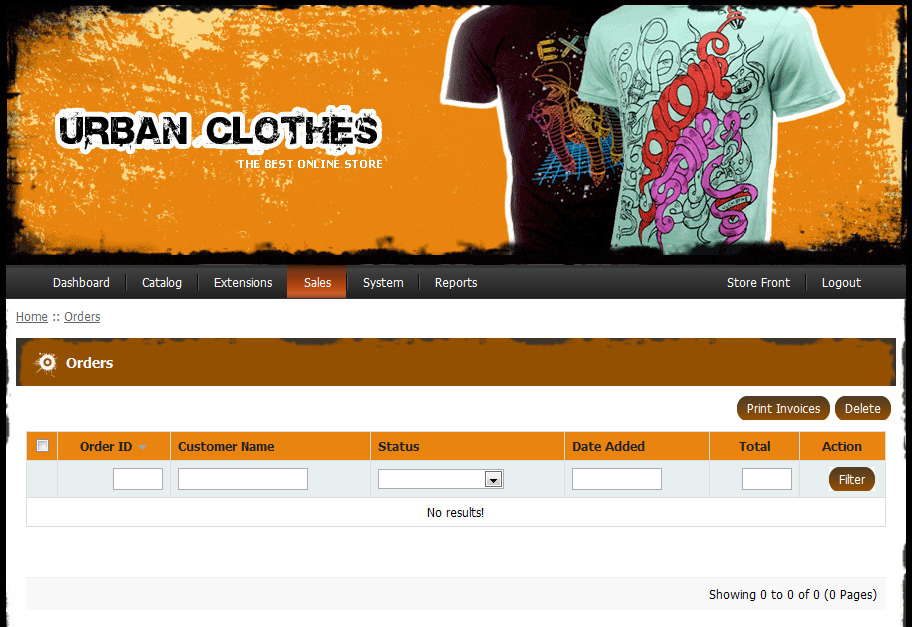
The Sales secion of the Admin Control Panel consists of the following:
Orders - This section allows you to view and delete orders as well as an option to print sales invoices.
Customers - Here you can add, edit, approve and delete customer details.
Orders - This section allows you to view and delete orders as well as an option to print sales invoices.
Customers - Here you can add, edit, approve and delete customer details.
 Click to enlarge
Coupons - This area allows you to create discounts, special offers and coupons either as a percentage or whole figure.
Mail - The mail section allows you to send custom emails / newsletters linked to customer accounts or previous orders.
Mail - The mail section allows you to send custom emails / newsletters linked to customer accounts or previous orders.
Reports
 Click to enlarge
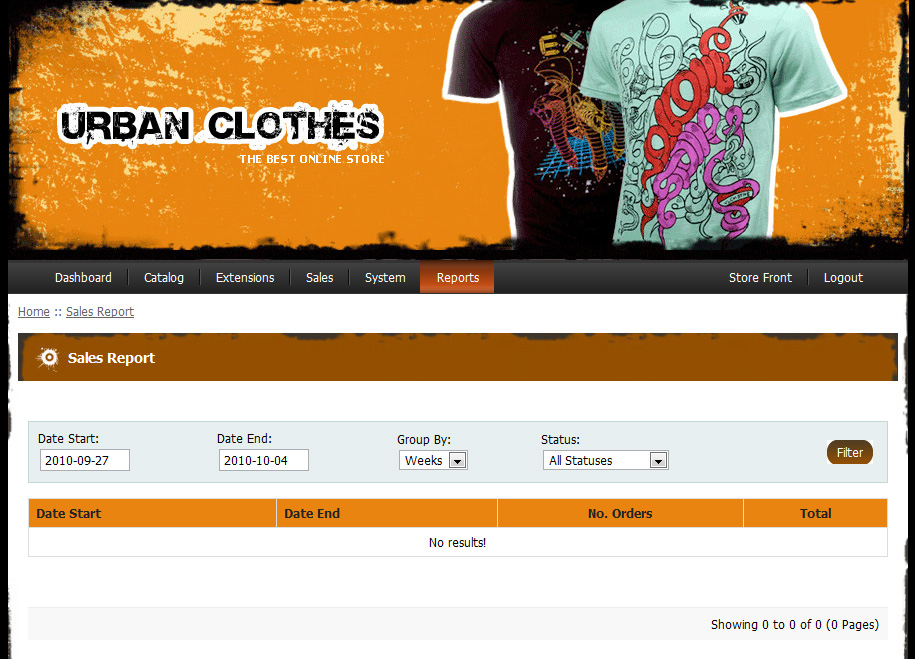
The Reports area has 3 main sections:
Sales - This area allows you to view the total amount of sales by day, week or month.
Products Viewed - The products viewed section is where you can see which products have been viewed the most and least within your shop.
Sales - This area allows you to view the total amount of sales by day, week or month.
Products Viewed - The products viewed section is where you can see which products have been viewed the most and least within your shop.
 Click to enlarge
Products Purchased - This area allows you to see which products have been sold the most within your shop.
Our Services
Free Quotation
Enter your details below to receive a free quotation. In order for us to be as accurate as possible please describe in as much detail what you require.